iptables with Network Card Aliases
At some point you may be interested in building a firewall for your
dedicated server that you lease from a hosting company. Once you do
that you will be faced with trying to work with the assigned IP
Addresses to the server. Typically hosting companies will assign a
subnet and use aliases for the one Ethernet card that is used on the
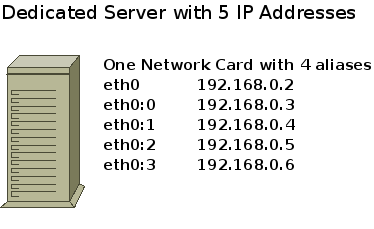
server. It will look something like what you see in the image below.
The problem is, iptables will not recognize aliases for the Ethernet card.

Here is an example subnet for building the firewall.
IP Usable Range 192.168.0.1-6
Gateway 192.168.0.1
Subnet Mask 255.255.255.248
subnet ID 192.168.0.0
Broadcast 192.168.0.7
The main thing to remember with your firewall is that you only have
one Lan Interface, eth0 and so you cannot reference eth0:0 because
iptables will not recognize it. All IP Addresses are on eth0 in reality
and that is how iptables will see it.
You will need to enter all of the IP Addresses. Here you can see
each IP is assigned a variable so you can use it later in the script.
LAN_IP=”192.168.0.2″
LAN_IP1=”192.168.0.3″
LAN_IP2=”192.168.0.4″
LAN_IP3=”192.168.0.5″
LAN_IP4=”192.168.0.6″
This section shows you that you can now manage each of the IP
Addresses separately. So for example, you can allow port 80 connections
on four IP Addresses but not on the last.
# Web Services
iptables -A INPUT -p tcp –destination $LAN_IP –dport 80 -j ACCEPT
iptables -A INPUT -p tcp –destination $LAN_IP1 –dport 80 -j ACCEPT
iptables -A INPUT -p tcp –destination $LAN_IP2 –dport 80 -j ACCEPT
iptables -A INPUT -p tcp –destination $LAN_IP3 –dport 80 -j ACCEPT
iptables -A INPUT -p tcp –destination $LAN_IP4 –dport 80 -j DROP
#!/bin/bash
# This script comes with no warranty …use at own risk
# This program is free software; you can redistribute it and/or modify
# it under the terms of the GNU General Public License as published by
# the Free Software Foundation; version 2 of the License.
#
# This program is distributed in the hope that it will be useful,
# but WITHOUT ANY WARRANTY; without even the implied warranty of
# MERCHANTABILITY or FITNESS FOR A PARTICULAR PURPOSE. See the
# GNU General Public License for more details.
#
# You should have received a copy of the GNU General Public License
# along with this program or from the site that you downloaded it
# from; if not, write to the Free Software Foundation, Inc., 59 Temple
# Place, Suite 330, Boston, MA 02111-1307 USA
########################################
LAN_INTERFACE=”eth0″
LOOPBACK_INTERFACE=”lo”
########################################
# Enter Your LAN IP Address #
########################################
LAN_IP=”192.168.0.2″
LAN_IP1=”192.168.0.3″
LAN_IP2=”192.168.0.4″
LAN_IP3=”192.168.0.5″
LAN_IP4=”192.168.0.6″
########################################
# Enter LAN Subnet #
########################################
LAN_ADDRESSES=”192.168.0.0/29″
LAN_NET=”192.168.0.0/255.255.255.248″
########################################
# Enter Broadcast Address #
########################################
LAN_BROADCAST=”192.168.0.7″
########################################
# Enter Your Netmask #
########################################
LAN_NETMASK=”255.255.255.248″
########################################
# Enter Your DNS Server #
########################################
NAMESERVER=”192.168.0.200″
LOOPBACK=”127.0.0.0/8″
CLASS_A=”10.0.0.0/8″
CLASS_B=”172.16.0.0/12″
CLASS_C=”192.168.0.0/16″
CLASS_D_MULTICAST=”224.0.0/4″
CLASS_E_RESERVED_NET=”240.0.0/5″
BROADCAST_SRC=”0.0.0.0″
BROADCAST_DEST=”255.255.255.255″
#############################################
# Enter the IP Address of the Administrator #
# The only IP to Access the Hardware Node #
#############################################
ADMIN=”192.168.0.10″
#############################################
# Special Temporary Access Site #
#############################################
SPECIAL=”192.168.0.11″
#############################################
# Disable source routed packets
for f in /proc/sys/net/ipv4/conf/*/accept_source_route; do
echo 0 > $f
done
# Disable ICMP Redirect Acceptance
for f in /proc/sys/net/ipv4/conf/*/accept_redirects; do
echo 0 > $f
done
# Don’t send redirect messages
for f in /proc/sys/net/ipv4/conf/*/send_redirects; do
echo 0 > $f
done
#Drop spoofed packets
for f in /proc/sys/net/ipv4/conf/*/rp_filter; do
echo 1 > $f
done
##################################################
# remove existing rules
iptables –flush
iptables -t mangle –flush
# Unlimited traffic on the loopback
iptables -A INPUT -i lo -j ACCEPT
iptables -A OUTPUT -o lo -j ACCEPT
# Set default policy to Drop
iptables –policy INPUT DROP
iptables –policy OUTPUT DROP
# Remove pre-existent chains
iptables –delete-chain
###################################################
# DNS to SERVER #
###################################################
iptables -A INPUT -p udp –sport 53 -j ACCEPT
iptables -A OUTPUT -p udp -j ACCEPT
##################################################
# Stealth Scans and TCP State Flags #
##################################################
# All bits cleared
iptables -A INPUT -p tcp –tcp-flags ALL NONE -j DROP
# SYN and FIN are both set
iptables -A INPUT -p tcp –tcp-flags SYN,FIN SYN,FIN -j DROP
# SY and RSY set
iptables -A INPUT -p tcp –tcp-flags SYN,RST SYN,RST -j DROP
# FIN and RST set
iptables -A INPUT -p tcp –tcp-flags FIN,RST FIN,RST -j DROP
# FIN is inly bit set, without ACK
iptables -A INPUT -p tcp –tcp-flags ACK,FIN FIN -j DROP
# PSH isn only bit set, without ACK
iptables -A INPUT -p tcp –tcp-flags ACK,PSH PSH -j DROP
# URG is only bit without ACK
iptables -A INPUT -p tcp –tcp-flags ACK,URG URG -j DROP
#######################################################
# Connection State to By-Pass Rule Checking
iptables -I INPUT -m state –state ESTABLISHED,RELATED -j ACCEPT
iptables -I OUTPUT -m state –state ESTABLISHED,RELATED -j ACCEPT
#####################################################
# SSH ACCESS TO SERVER #
######################################################
iptables -A INPUT -p tcp -s $ADMIN –dport 22 -j ACCEPT
iptables -A OUTPUT -p tcp –destination $ADMIN -j ACCEPT
iptables -A INPUT -p tcp -s $SPECIAL –dport 22 -j ACCEPT
iptables -A OUTPUT -p tcp –destination $SPECIAL -j ACCEPT
######################################################
# Web Services
iptables -A INPUT -p tcp –destination $LAN_IP –dport 80 -j ACCEPT
iptables -A INPUT -p tcp –destination $LAN_IP1 –dport 80 -j ACCEPT
iptables -A INPUT -p tcp –destination $LAN_IP2 –dport 80 -j ACCEPT
iptables -A INPUT -p tcp –destination $LAN_IP3 –dport 80 -j ACCEPT
iptables -A INPUT -p tcp –destination $LAN_IP4 –dport 80 -j DROP
#########################################################
#Source Address Spoofing/Bad Addresses
# Refuse spoofed packets
iptables -A INPUT -s $LAN_IP -j DROP
iptables -A INPUT -s $LAN_IP1 -j DROP
iptables -A INPUT -s $LAN_IP2 -j DROP
iptables -A INPUT -s $LAN_IP3 -j DROP
iptables -A INPUT -s $LAN_IP4 -j DROP
iptables -A OUTPUT -o $LAN_INTERFACE -s ! $LAN_IP -j DROP
iptables -A OUTPUT -o $LAN_INTERFACE -s ! $LAN_IP1 -j DROP
iptables -A OUTPUT -o $LAN_INTERFACE -s ! $LAN_IP2 -j DROP
iptables -A OUTPUT -o $LAN_INTERFACE -s ! $LAN_IP3 -j DROP
iptables -A OUTPUT -o $LAN_INTERFACE -s ! $LAN_IP4 -j DROP
# Refuse malformed broadcast packets
iptables -A INPUT -i $LAN_INTERFACE -d $BROADCAST_SRC -j DROP
# Don’t forward limited broadcast either way
iptables -A INPUT -p ! udp -d $CLASS_D_MULTICAST -j DROP
#########################################################
# ICMP control and status messages
# Log and drop initial ICMP fragments
iptables -A INPUT –fragment -p icmp -j LOG –log-prefix “Fragmented incoming ICMP: ”
iptables -A INPUT –fragment -p icmp -j DROP
iptables -A OUTPUT –fragment -p icmp -j LOG –log-prefix “Fragmented outgoing ICMP: ”
iptables -A OUTPUT –fragment -p icmp -j DROP
iptables -A INPUT -p icmp –icmp-type source-quench -d $LAN_IP -j ACCEPT
iptables -A INPUT -p icmp –icmp-type source-quench -d $LAN_IP1 -j ACCEPT
iptables -A INPUT -p icmp –icmp-type source-quench -d $LAN_IP2 -j ACCEPT
iptables -A INPUT -p icmp –icmp-type source-quench -d $LAN_IP3 -j ACCEPT
iptables -A INPUT -p icmp –icmp-type source-quench -d $LAN_IP4 -j ACCEPT
iptables -A OUTPUT -p icmp –icmp-type source-quench -j ACCEPT
iptables -A INPUT -p icmp –icmp-type parameter-problem -j ACCEPT
iptables -A OUTPUT -p icmp –icmp-type parameter-problem -j ACCEPT
iptables -A INPUT -p icmp –icmp-type destination-unreachable -j ACCEPT
iptables -A OUTPUT -o $LAN_INTERFACE -p icmp –icmp-type destination-unreachable -d $LAN_ADDRESSES -j ACCEPT
iptables -A OUTPUT -p icmp –icmp-type fragmentation-needed -j ACCEPT
# Don’t Log outgoing ICMP error messages
iptables -A OUTPUT -p icmp –icmp-type destination-unreachable -j DROP
#################################################
# LOGS #
#################################################
iptables -A INPUT -i $LAN_INTERFACE -j LOG
iptables -A OUTPUT -j LOG
exit 0
@@@@@@@@@@@@@@@@@@@@@@@@@@@@@@@@@@@@@@@@@@@@
|
|
|
|
|
|
|
|
|
|
|
|
|
|
|
In this example of a simple setup of a bridge firewall you see how a
bridge can protect a server. The router of course, has both an external
IP Address to the Internet and an internal address to the the
192.168.7.0/24 network. This means that the router is doing NAT, Network
Address Translation. The bridge is given an IP Address to be able to
configure remotely. Note that the two network interfaces do not have IP
Addresses. If you look using ifconfig all you will see are MAC
Addresses. However you will see that the bridge br0 will have the IP
Address 192.168.7.3. A switch is placed between the bridge and the mail
server to act as an additional layer of security. This would be
especially true if you added workstations or additional servers to that
switch.
Lesson 3 / Lesson 5

In order to set this up create a file called rc.firewall and place it in the /etc directory. Make it executable with:
chmod 755 /etc/rc.firewall
Here is a sample script, modify and use at your own risk.
###############################################
#!/bin/bash
# This script comes with no warranty ...use at own risk
# Copyright (C) 2006 Mike Weber
#
# This program is free software; you can redistribute it and/or modify
# it under the terms of the GNU General Public License as published by
# the Free Software Foundation; version 2 of the License.
#
# This program is distributed in the hope that it will be useful,
# but WITHOUT ANY WARRANTY; without even the implied warranty of
# MERCHANTABILITY or FITNESS FOR A PARTICULAR PURPOSE. See the
# GNU General Public License for more details.
#
# You should have received a copy of the GNU General Public License
# along with this program or from the site that you downloaded it
# from; if not, write to the Free Software Foundation, Inc., 59 Temple
# Place, Suite 330, Boston, MA 02111-1307 USA
###########################################
br0="192.168.7.3"
GATEWAY_IP="192.168.7.2"
LAN_NET="192.168.7.0/255.255.255.0"
LAN_BROADCAST="192.168.7.255"
CLASS_A="10.0.0.0/8"
CLASS_B="172.16.0.0/12"
CLASS_C="192.168.0.0/16"
CLASS_D_MULTICAST="224.0.0/4"
CLASS_E_RESERVED_NET="240.0.0/4"
BROADCAST_SRC="O.O.O.0"
BROADCAST_DEST="255.255.255.255"
WEB="192.168.7.120"
WEB2="192.168.7.122"
WEB3="192.168.7.126"
MAIL="192.168.7.123"
ADMIN="192.168.7.119"
###########################################
# Add protection from the kernel
echo 1 > /proc/sys/net/ipv4/icmp_echo_ignore_broadcasts
for f in /proc/sys/net/ipv4/conf/*/accept_source_route; do
echo 0 > $f
done
for f in /proc/sys/net/ipv4/conf/*/accept_redirects; do
echo 0 > $f
done
for f in /proc/sys/net/ipv4/conf/*/send_redirects; do
echo 0 > $f
done
for f in /proc/sys/net/ipv4/conf/*/rp_filter; do
echo 1 > $f
done
for f in /proc/sys/net/ipv4/conf/*/log_martians; do
echo 1 > $f
done
###########################################
# Remove existing rules
iptables --flush
iptables -t nat --flush
iptables -t mangle --flush
# Unlimited loopback traffic
iptables -A INPUT -i lo -j ACCEPT
iptables -A OUTPUT -o lo -j ACCEPT
# Set Policies to drop
iptables --policy INPUT DROP
iptables --policy OUTPUT DROP
iptables --policy FORWARD DROP
# Remove pre-existing user defined
iptables --delete-chain
iptables -t nat --delete-chain
iptables -t mangle --delete-chain
#############################################
# Stop Stealth Scans and TCP State Flags
iptables -A FORWARD -p tcp --tcp-flags ALL NONE -j DROP
iptables -A FORWARD -p tcp --tcp-flags SYN,FIN SYN,FIN -j DROP
iptables -A FORWARD -p tcp --tcp-flags SYN,RST SYN,RST -j DROP
iptables -A FORWARD -p tcp --tcp-flags FIN,RST FIN,RST -j DROP
iptables -A FORWARD -p tcp --tcp-flags ACK,FIN FIN -j DROP
iptables -A FORWARD -p tcp --tcp-flags ACK,PSH PSH -j DROP
iptables -A FORWARD -p tcp --tcp-flags ACK,URG URG -j DROP
############################################
# Connection State to By-Pass Rule Checking
iptables -A FORWARD -m state --state ESTABLISHED,RELATED -j ACCEPT
iptables -A OUTPUT -m state --state ESTABLISHED,RELATED -j ACCEPT
iptables -A INPUT -m state --state INVALID -j DROP
iptables -A OUTPUT -m state --state INVALID -j DROP
iptables -A FORWARD -m state --state INVALID -j DROP
#####################################################
# SPECIAL
iptables -A INPUT -p tcp -s $ADMIN -m state --state NEW --dport 22 -j ACCEPT
iptables -A INPUT -p tcp -s $ADMIN --dport 22 -j ACCEPT
#####################################################
# No Matter What I Want to Block These Ports
iptables -A FORWARD -p tcp --dport 4444 -j DROP
iptables -A FORWARD -p tcp --dport 135 -j DROP
# Don't forward limited broadcast either way
iptables -A FORWARD -d $BROADCAST_DEST -j DROP
iptables -A FORWARD -p ! udp -d $CLASS_D_MULTICAST -j DROP
#########################################################
# ICMP control and status messages
# Log and drop initial ICMP fragments
iptables -A INPUT --fragment -p icmp -j DROP
iptables -A OUTPUT --fragment -p icmp -j DROP
iptables -A FORWARD --fragment -p icmp -j DROP
# Flow Control - Mostly Used on LANs
iptables -A FORWARD -p icmp --icmp-type source-quench -j ACCEPT
# Unexpected Data in Header or Checksum Error
iptables -A FORWARD -p icmp --icmp-type parameter-problem -j ACCEPT
# STOP NMAP SCANS
iptables -A FORWARD -p icmp --icmp-type destination-unreachable -j DROP
# Disable Traceroute
iptables -A FORWARD -p icmp --icmp-type time-exceeded -j DROP
# Disable Ping
iptables -I FORWARD -p icmp --icmp-type echo-request -j DROP
# Block DHCP Port 68
iptables -A FORWARD -p tcp --dport 68 -j DROP
iptables -A FORWARD -p tcp --dport 1434 -j DROP
#############################################
# BLOCK COUNTRY ATTACKS
BADIP=/etc/banned
BANNED=$( grep -v -E "^#" $BADIP )
for ip in $BANNED
do
iptables -A INPUT -p tcp -s $ip -j DROP
iptables -A FORWARD -p tcp -s $ip -j DROP
done
##############################################
# MAIL Web
iptables -A FORWARD -p tcp -d $MAIL --dport 80 -m state --state NEW -j ACCEPT
iptables -A FORWARD -p tcp --src $MAIL -m state --state NEW -j ACCEPT
# WEB Web
iptables -A FORWARD -p tcp -d $WEB --dport 80 -m state --state NEW -j ACCEPT
iptables -A FORWARD -p tcp --src $WEB -m state --state NEW -j ACCEPT
# WEB Web
iptables -A FORWARD -p tcp -d $WEB --dport 80 -m state --state NEW -j ACCEPT
iptables -A FORWARD -p tcp --src $WEB -m state --state NEW -j ACCEPT
# WEB3 Web
iptables -A FORWARD -p tcp -d $WEB3 --dport 80 -m state --state NEW -j ACCEPT
iptables -A FORWARD -p tcp --src $WEB3 -m state --state NEW -j ACCEPT
# WEB2 WEB
iptables -A FORWARD -p tcp -d $WEB2 --dport 80 -m state --state NEW -j ACCEPT
iptables -A FORWARD -p tcp --src $WEB2 -m state --state NEW -j ACCEPT
# ADMIN Web
iptables -A FORWARD -p tcp --src $ADMIN -m state --state NEW -j ACCEPT
iptables -A FORWARD -p udp --src $ADMIN -m state --state NEW -j ACCEPT
###############################################
# MAIL DNS includes settings for Client and Zone Transfers
iptables -A FORWARD -p udp --sport 1024:65535 -d $MAIL --dport 53 -m state --state NEW -j ACCEPT
iptables -A FORWARD -p tcp --sport 53 -d $MAIL --dport 1024:65535 -m state --state NEW -j ACCEPT
iptables -A FORWARD -p udp --sport 53 -d $MAIL --dport 53 -m state --state NEW -j ACCEPT
iptables -A FORWARD -p udp --src $MAIL --sport 1024:65535 --dport 53 -m state --state NEW -j ACCEPT
iptables -A FORWARD -p tcp --src $MAIL --sport 1024:65535 --dport 53 -m state --state NEW -j ACCEPT
iptables -A FORWARD -p tcp --src $MAIL --sport 53 --dport 1024:65535 -m state --state NEW -j ACCEPT
iptables -A FORWARD -p udp --src $MAIL --sport 53 --dport 53 -m state --state NEW -j ACCEPT
##################################
# MAIL SERVER AND CLIENTS FOR POP3 AND IMAP
# MAIL MAIL SERVER SMTP
iptables -A FORWARD -p tcp --sport 25 -d $MAIL --dport 1024:65535 -m state --state NEW -j ACCEPT
iptables -A FORWARD -p tcp --src $MAIL --sport 1024:65535 --dport 25 -m state --state NEW -j ACCEPT
iptables -A FORWARD -p tcp --sport 1024:65535 -d $MAIL --dport 25 -m state --state NEW -j ACCEPT
iptables -A FORWARD -p tcp --src $MAIL --sport 25 --dport 1024:65535 -m state --state NEW -j ACCEPT
# POP3
iptables -A FORWARD -p tcp --src $MAIL --sport 1024:65535 --dport 110 -m state --state NEW -j ACCEPT
iptables -A FORWARD -p tcp --sport 110 -d $MAIL --dport 1024:65535 -m state --state NEW -j ACCEPT
iptables -A FORWARD -p tcp --sport 1024:65535 -d $MAIL --dport 110 -m state --state NEW -j ACCEPT
iptables -A FORWARD -p tcp --src $MAIL --sport 110 --dport 1024:65535 -m state --state NEW -j ACCEPT
# IMAPS
iptables -A FORWARD -p tcp --sport 1024:65535 -d $MAIL --dport 993 -m state --state NEW -j ACCEPT
iptables -A FORWARD -p tcp --sport 1024:65535 -d $MAIL --dport 993 -j ACCEPT
iptables -A FORWARD -p tcp ! --syn -s $MAIL --sport 993 --dport 1024:65535 -j ACCEPT
# IMAP
iptables -A FORWARD -p tcp --src $MAIL --sport 1024:65535 --dport 143 -m state --state NEW -j ACCEPT
iptables -A FORWARD -p tcp --sport 143 -d $MAIL --dport 1024:65535 -m state --state NEW -j ACCEPT
iptables -A FORWARD -p tcp --sport 1024:65535 -d $MAIL --dport 143 -m state --state NEW -j ACCEPT
iptables -A FORWARD -p tcp --src $MAIL --sport 143 --dport 1024:65535 -m state --state NEW -j ACCEPT
##################################
# LOGS
iptables -A FORWARD -j LOG
iptables -A OUTPUT -j LOG
iptables -A INPUT -j LOG
##########################################
exit 0
|